 Matsubo Tech Blog
561 文字
3 分
tig = gitをaptitudeのように使えるラッパー
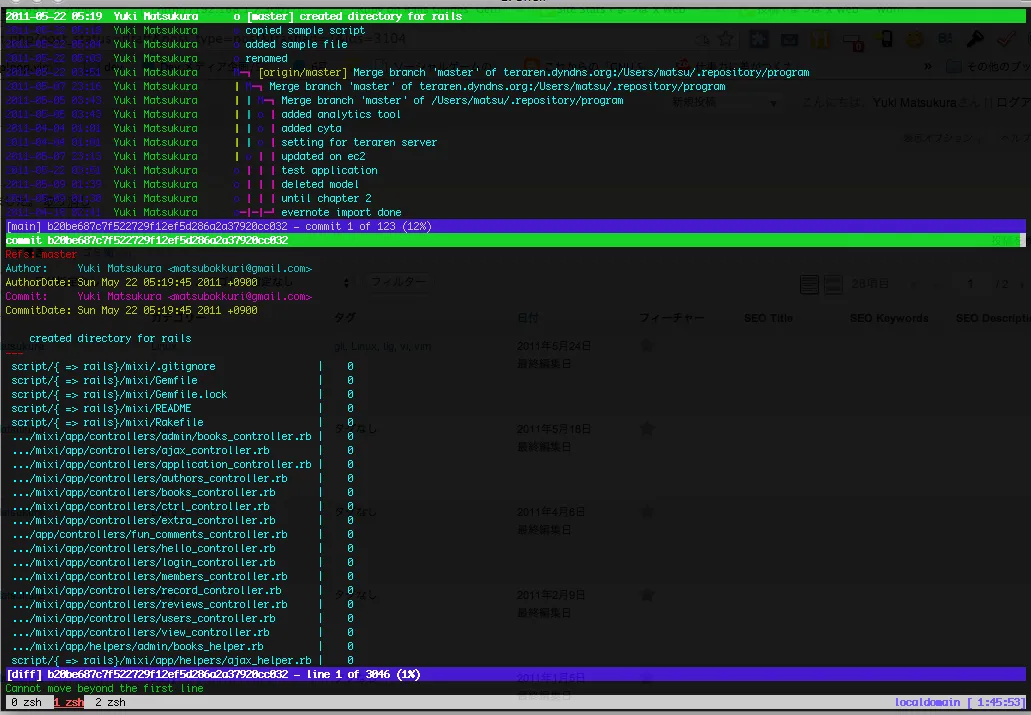
tig概要
gitのCLIラッパー。
gitコマンドをdpkgだとすると、tigはaptitudeというかんじ。
コマンド名の覚え方は、gitを逆から読む。
インストール
mac
# port install tigdebian
# aptitude install -y tig使い方
gitレポジトリ内でtigコマンドを打つ。
基本的にはvimと同じような操作感で扱える。かなり豊富なコマンドがあるので一歩一歩覚えていくのが良いと思う。
まず、覚えなきゃいけないのは「h」これでヘルプが出せるので、適宜調べていく。
以下にヘルプページを掲載する。特筆すべきは一番下の方にある、gitコマンドを直接呼び出せる便利なコマンド。
たとえば、「C」を打つだけでcherry-pickできる。
[-] generic bindingsView switching 'm' view-main Show main view 'd' view-diff Show diff view 'l' view-log Show log view 't' view-tree Show tree view 'f' view-blob Show blob view 'B' view-blame Show blame view 'H' view-branch Show branch view 'h' view-help Show help page 'p' view-pager Show pager view 'S' view-status Show status view 'c' view-stage Show stage viewView manipulation Enter enter Enter current line and scroll Down, '^N' next Move to next Up, '^P' previous Move to previous ',' parent Move to parent Tab view-next Move focus to next view 'R', F5 refresh Reload and refresh 'O' maximize Maximize the current view 'q' view-close Close the current view 'Q' quit Close all views and quitView specific requests 'u' status-update Update file status '!' status-revert Revert file changes 'M' status-merge Merge file using external tool '@' stage-next Find next chunk to stageCursor navigation 'k' move-up Move cursor one line up 'j' move-down Move cursor one line down PageDown, '^D', Space move-page-down Move cursor one page down PageUp, '^U', 'b', '-' move-page-up Move cursor one page up Home move-first-line Move cursor to first line End move-last-line Move cursor to last lineScrolling '|' scroll-first-col Scroll to the first line columns Left scroll-left Scroll two columns left Right scroll-right Scroll two columns right Insert, '^Y' scroll-line-up Scroll one line up Delete, '^E' scroll-line-down Scroll one line down 'w' scroll-page-up Scroll one page up 's' scroll-page-down Scroll one page downSearching '/' search Search the view '?' search-back Search backwards in the view 'n' find-next Find next search match 'N' find-prev Find previous search matchOption manipulation 'o' options Open option menu '.' toggle-lineno Toggle line numbers 'D' toggle-date Toggle date display 'A' toggle-author Toggle author display 'g' toggle-rev-graph Toggle revision graph visualization '~' toggle-graphic Toggle (line) graphics mode 'F' toggle-refs Toggle reference display (tags/branches) 'I' toggle-sort-order Toggle ascending/descending sort order 'i' toggle-sort-field Toggle field to sort byMisc ':' prompt Bring up the prompt 'r', '^L' screen-redraw Redraw the screen 'v' show-version Show version information 'z' stop-loading Stop all loading views 'e' edit Open in editorExternal commands: 'G' `git gc`[-] main bindingsExternal commands: 'C' `git cherry-pick %(commit)`[-] branch bindingsExternal commands: 'C' `git checkout %(branch)`[-] status bindingsExternal commands: 'C' `git commit` tig = gitをaptitudeのように使えるラッパー
https://blog.teraren.com/posts/tig-git/ 関連記事


この記事が役に立ったら
GitHub Sponsorsで応援できます